
Maintenance on a server
Evacuate the server, do the work, then restore it. Its instances move to other servers, or stop, until you restore it. A container on local storage typically moves in about ten seconds and keeps its addresses.
The names in the pictures are examples.
Evacuate
In Fabric Console, open Servers → Members and choose Evacuate… on an Online member.
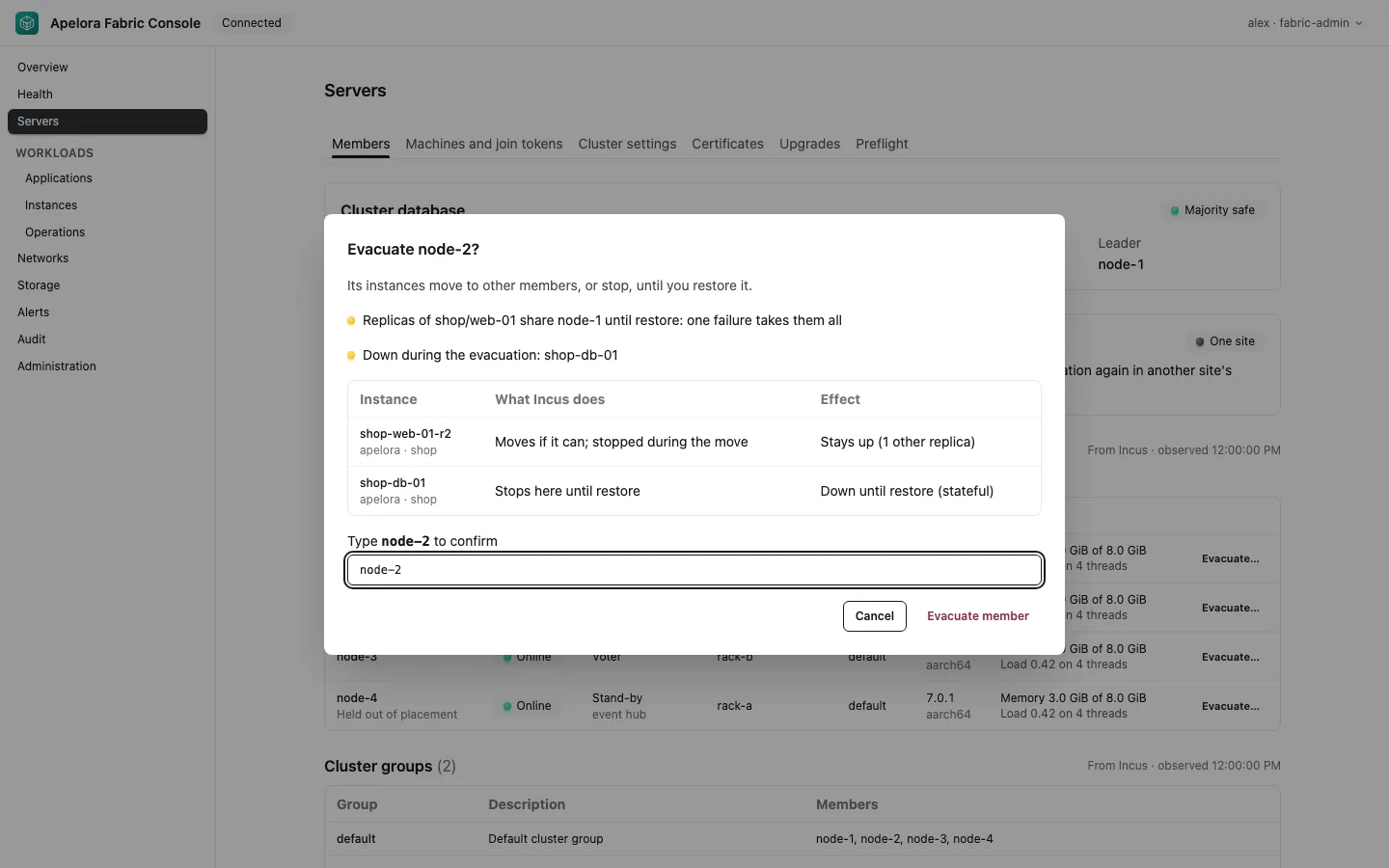
Read the dry run before you type the name.
- What Incus does comes from the instance's
cluster.evacuatemode.automoves it while it is stopped. A volume that cannot move makes Incus stop the instance on this server until restore. - Effect. Replicas elsewhere keep the service up. A single instance, or a stateful module, is down while it moves, or until restore if it only stops.
- Blocked. No other member is Online, or none has the instance's architecture. Fix that first. Evacuation is refused while anything blocks it.
- Warnings. Replicas will share the remaining servers until you restore this one.
The same dry run from the API. API is the control plane, and TOKEN is an API token:
curl -sS -H "Authorization: Bearer $TOKEN" \
  "$API/api/v1/cluster/members/node-2/evacuation"
Type the member's name and choose Evacuate member.
curl -sS -H "Authorization: Bearer $TOKEN" -H "Content-Type: application/json" \
  -d '{"confirm":"node-2"}' \
  -X POST "$API/api/v1/cluster/members/node-2/evacuate"
Before Incus moves anything, Apelora takes the replicas on this server out of their service addresses, so no request goes to one that is about to stop. A replica whose service has no other replica keeps serving until it stops. This takes a few seconds per application, at most APELORA_DRAIN_WAIT_SECS (30 s by default); the confirmation says what was done, for example Took 2 replicas of 1 application out of their service addresses first. If it does not finish in time, the evacuation goes ahead and says so, and requests to those replicas can fail for up to about ten seconds, until the load balancer's health check takes them out.
The member shows Evacuating, then Evacuated. A moved replica rejoins its service address once it runs on its new server and has its address (the worker checks every APELORA_SUPERVISE_SECS). The replica supervisor does not start a replacement for an instance on a member that is not Online. A replica that Incus has moved but not started yet is left for Incus to start; the supervisor starts it only if it is still stopped 60 s later.
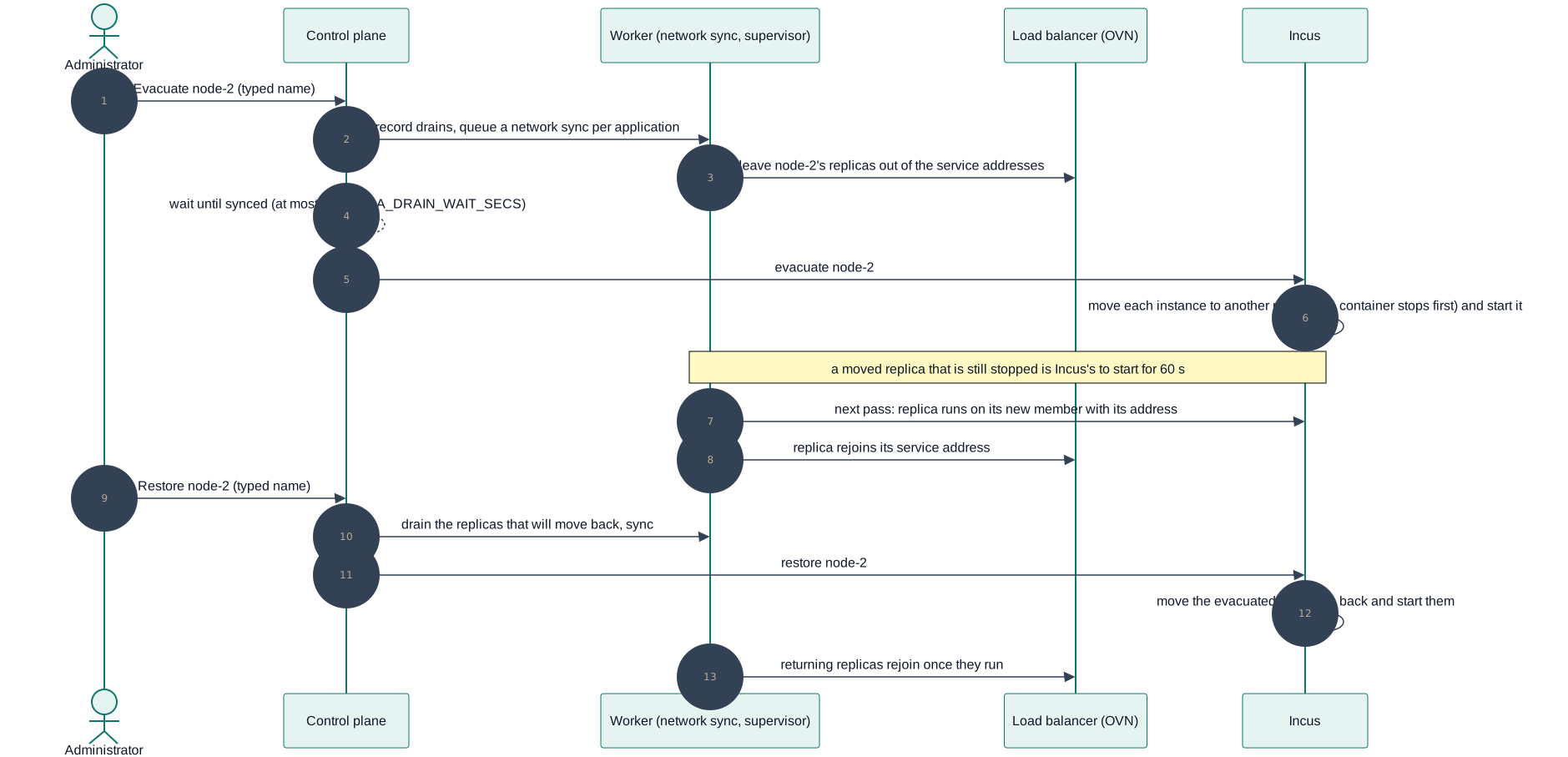
Diagram source
sequenceDiagram
  autonumber
  actor A as Administrator
  participant C as Control plane
  participant W as Worker (network sync, supervisor)
  participant L as Load balancer (OVN)
  participant I as Incus
  A->>C: Evacuate node-2 (typed name)
  C->>W: record drains, queue a network sync per application
  W->>L: leave node-2's replicas out of the service addresses
  C-->>C: wait until synced (at most APELORA_DRAIN_WAIT_SECS)
  C->>I: evacuate node-2
  I->>I: move each instance to another member (a container stops first) and start it
  Note over W,I: a moved replica that is still stopped is Incus's to start for 60 s
  W->>I: next pass: replica runs on its new member with its address
  W->>L: replica rejoins its service address
  A->>C: Restore node-2 (typed name)
  C->>W: drain the replicas that will move back, sync
  C->>I: restore node-2
  I->>I: move the evacuated instances back and start them
  W->>L: returning replicas rejoin once they run
Do the work
Updates, a reboot, or hardware. The instances stay where the evacuation put them.
Restore
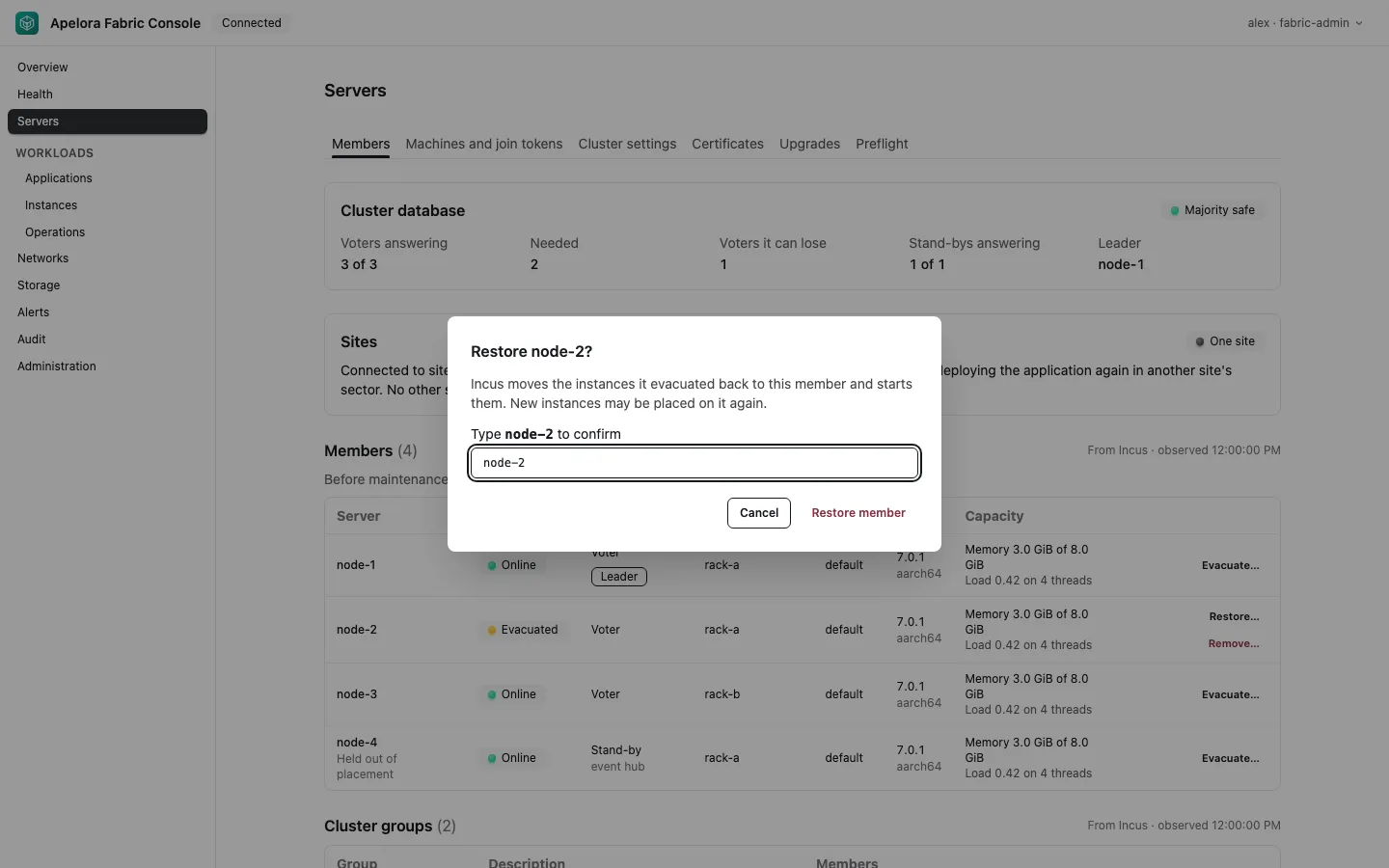
On the evacuated member, choose Restore…, type its name, and confirm. Apelora first takes the replicas that will move back out of their service addresses, the same way; Incus then moves the evacuated instances back and starts them, and they rejoin their service addresses once they run. New instances may be placed on it again.
curl -sS -H "Authorization: Bearer $TOKEN" -H "Content-Type: application/json" \
  -d '{"confirm":"node-2"}' \
  -X POST "$API/api/v1/cluster/members/node-2/restore"
Check
The member is Online. Each application's instances are on the servers you expect. Its service addresses answer.
Both actions need cluster.evacuate (the Fabric Administrator role; for an API token, manage-infrastructure). They are audited as cluster.member.evacuate and cluster.member.restore.
Move one module first
A virtual machine with Keep running when moved (Studio, Availability) moves to another server while it runs. In Fabric Console open Instances → Move…, or let evacuation move it. A container, or a virtual machine whose volumes are on its own server, stops for the move: Move… with Allow a short stop copies the volumes and starts it on the new server.
This page is a copy of docs/runbooks/member-maintenance.md in the repository, which is the source of truth. Suggest a change.