
Access, roles and security by layer
Status: core built. Scoped roles, OIDC validation, the evaluator, approvals, emergency access, service identities and audit are implemented and tested; see identity and authorization for what is built and what is NOT VERIFIED (live identity provider, MAAS, Incus restricted projects). This document keeps the design rationale.
Evidence labels used below: BUILT (in the repository and tested), PROPOSED (agreed direction, not built).
1. Principles
- The server decides. The Studio and the Console hide or disable what a person may not do, but only to be helpful. Every API route names the permission it needs and checks it on the server.
- One place maps roles to permissions (
Role::allowsincrates/domain). No route, screen or script re-implements it. - Least privilege, separated duties. A designer can propose; an operator can run; an administrator can change the platform; an auditor can only read. No role is needed for everything.
- Two authorities, never mixed. Apelora decides who may design, deploy and operate applications. Incus decides what a certificate may do inside Incus. The browser never holds Incus credentials.
- Defence in depth. A mistake in one layer (a missing check in a screen) must not be enough to cause harm in the next.
- Everything that matters is audited, with who, what, when, on which object, and the outcome. Secrets never appear in the audit log.
- Membership is a grant. Adding someone to a group, or taking a group's members from an identity provider or a directory, gives them the group's roles. It therefore passes the same escalation check as assigning a role directly, and removing someone from such a group passes the same check as revoking the role, and a group's outside members come only from the one source it names: another provider, or another part of the directory, with a group of the same name gives nothing (ADR 0016).
- A second person means a person. An approval is decided by someone signed in as themselves, never by an API token, which the audit trail would record as someone else.
2. User roles, access levels and interfaces
The following diagram shows how user roles relate to RBAC access levels and the typical interfaces they use.
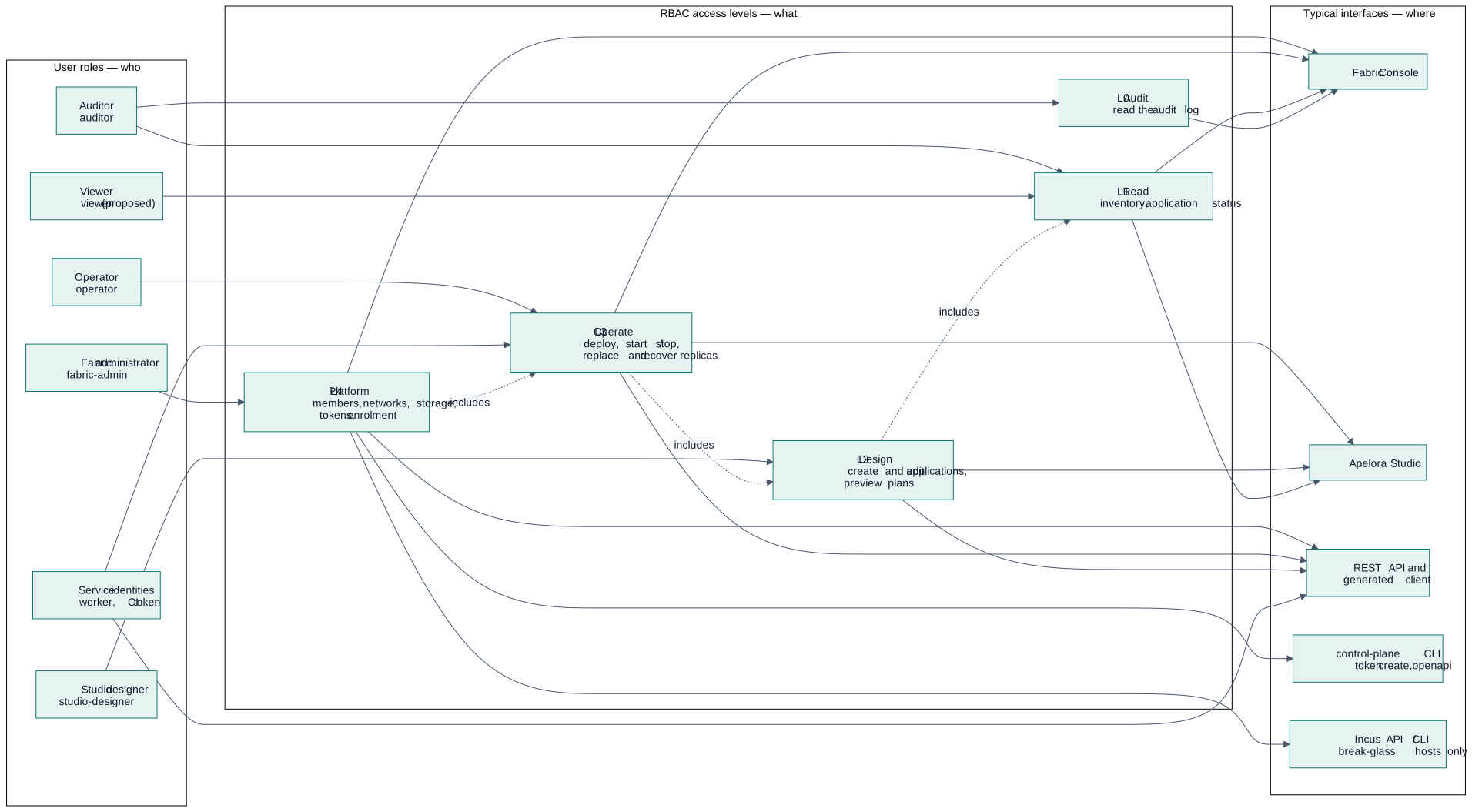
Diagram source
flowchart LR
  subgraph R["User roles — who"]
    A["Fabric administrator<br/>fabric-admin"]
    O["Operator<br/>operator"]
    D["Studio designer<br/>studio-designer"]
    U["Auditor<br/>auditor"]
    V["Viewer<br/>viewer (proposed)"]
    S["Service identities<br/>worker, CI token"]
  end

  subgraph L["RBAC access levels — what"]
    L4["L4 Platform<br/>members, networks, storage,<br/>tokens, enrolment"]
    L3["L3 Operate<br/>deploy, start / stop,<br/>replace and recover replicas"]
    L2["L2 Design<br/>create and edit applications,<br/>preview plans"]
    L1["L1 Read<br/>inventory, application status"]
    L0["L0 Audit<br/>read the audit log"]
  end

  subgraph I["Typical interfaces — where"]
    C["Fabric Console"]
    ST["Apelora Studio"]
    API["REST API and<br/>generated client"]
    CLI["control-plane CLI<br/>token create, openapi"]
    INC["Incus API / CLI<br/>break-glass, hosts only"]
  end

  A --> L4
  O --> L3
  D --> L2
  U --> L1
  U --> L0
  V --> L1
  S --> L3

  L4 -.includes.-> L3
  L3 -.includes.-> L2
  L2 -.includes.-> L1

  L4 --> C
  L4 --> CLI
  L4 --> INC
  L3 --> C
  L3 --> ST
  L2 --> ST
  L1 --> C
  L1 --> ST
  L0 --> C
  L4 --> API
  L3 --> API
  L2 --> API
  S --> API
How to read it: a role grants one access level; a higher level includes the ones below it (a solid line from a level to an interface means that interface offers actions at that level). The Incus API is reachable only from hosts, by administrators, as break-glass (see §7); applications and tenants never touch it. Service identities use the API only; the deployment worker additionally holds the Incus deploy identity, restricted to its projects.
2.1 Roles today and proposed
| Role | State | Purpose | Cannot |
|---|---|---|---|
fabric-admin | BUILT | Runs the platform: members, networks, storage, enrolment, tokens | — (all permissions) |
operator | BUILT | Runs workloads: deploys and operates applications | Change infrastructure or tokens |
studio-designer | BUILT | Designs applications in the Studio | Deploy, change infrastructure |
auditor | BUILT | Reads inventory and the audit log | Design, deploy, change anything |
viewer | PROPOSED | Stakeholders: sees applications and their health, no audit log, no inventory of other tenants | Anything that changes state |
| Service identities | BUILT (tokens) / PROPOSED (scopes) | Worker, CI, integrations; short-lived, narrow, never a person's token | Interactive use |
2.2 Permissions
| Permission | BUILT meaning | PROPOSED split |
|---|---|---|
read-inventory | Members, instances, networks, pools, applications | read-applications (per project) separate from read-inventory (infrastructure) |
read-audit | Audit log | Unchanged; may be scoped to a project |
manage-tokens | Create and revoke API tokens | Unchanged; platform scope only |
manage-infrastructure | Members, enrolment, evacuation, join tokens | Add manage-storage and manage-networks so storage or network teams need not be full administrators |
design-applications | Create and edit designs, preview plans | Add approve-deployment for optional four-eyes release control |
deploy | Deploy, start, stop, delete instances in allowed projects | Add operate-instances (start/stop/restart) apart from deploy (create/remove) |
2.3 Matrix (BUILT)
| Capability | fabric-admin | operator | studio-designer | auditor |
|---|---|---|---|---|
| See inventory and application status | ✓ | ✓ | ✓ | ✓ |
| Create and edit application designs, preview a plan | ✓ | ✓ | ✓ | — |
| Deploy, start, stop, delete application instances | ✓ | ✓ | — | — |
| Members, evacuation, machine enrolment, join tokens | ✓ | — | — | — |
See alerts (cluster.view) | ✓ | ✓ | ✓ | ✓ |
Acknowledge and silence alerts (alert.respond); change alert rules and webhooks (alert.configure) | ✓ | — | — | — |
| API tokens | ✓ | — | — | — |
| Audit log | ✓ | — | — | ✓ |
3. Scope: who may do it where (PROPOSED)
Today a role applies to the whole platform and deployments are limited by the allow-list APELORA_DEPLOY_PROJECTS. The target binds a role to a scope, so a team can design and run its own applications and see no one else's.
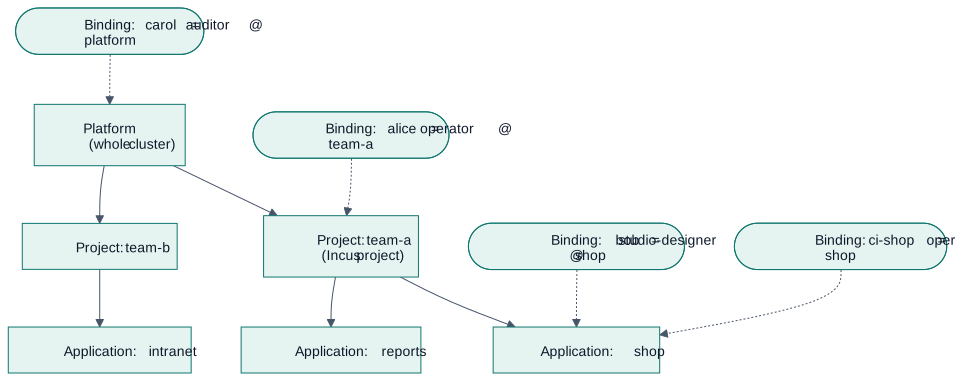
Diagram source
flowchart TB
  P["Platform<br/>(whole cluster)"] --> T1["Project: team-a<br/>(Incus project)"]
  P --> T2["Project: team-b"]
  T1 --> AP1["Application: shop"]
  T1 --> AP2["Application: reports"]
  T2 --> AP3["Application: intranet"]

  B1(["Binding: alice = operator @ team-a"]) -.-> T1
  B2(["Binding: bob = studio-designer @ shop"]) -.-> AP1
  B3(["Binding: carol = auditor @ platform"]) -.-> P
B4(["Binding: ci-shop = operator @ shop"]) -.-> AP1- A role binding is
(identity, role, scope). A binding at a scope applies to everything beneath it. - The
fabric-adminandauditorroles are normally bound at platform scope. Designers and operators are bound at project or application scope. - Each Apelora project maps to one Incus project (restricted, see §5). This keeps the Apelora authorisation and the Incus isolation aligned.
- Bindings live in PostgreSQL and are managed by administrators in the Console. Changes are audited.
4. Request path: how one action is authorised
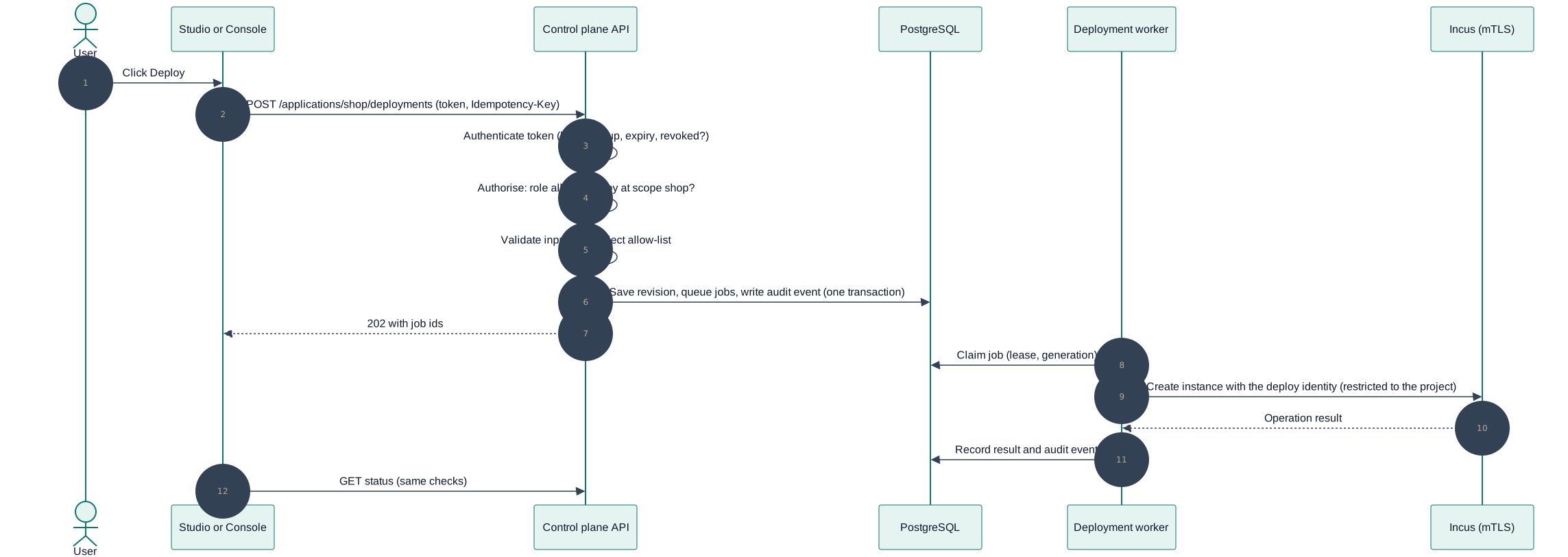
Diagram source
sequenceDiagram
  autonumber
  actor U as User
  participant UI as Studio or Console
  participant API as Control plane API
  participant DB as PostgreSQL
  participant W as Deployment worker
  participant I as Incus (mTLS)

  U->>UI: Click Deploy
  UI->>API: POST /applications/shop/deployments (token, Idempotency-Key)
  API->>API: Authenticate token (hash lookup, expiry, revoked?)
  API->>API: Authorise: role allows deploy at scope shop?
  API->>API: Validate input and project allow-list
  API->>DB: Save revision, queue jobs, write audit event (one transaction)
  API-->>UI: 202 with job ids
  W->>DB: Claim job (lease, generation)
  W->>I: Create instance with the deploy identity (restricted to the project)
  I-->>W: Operation result
  W->>DB: Record result and audit event
  UI->>API: GET status (same checks)
Points that matter: the check happens on the server (step 3), the audit write is in the same transaction as the work it describes (step 5), and the worker uses a different, narrower identity than the API's administrator identity (step 8, ADR 0003).
5. Best practice by layer
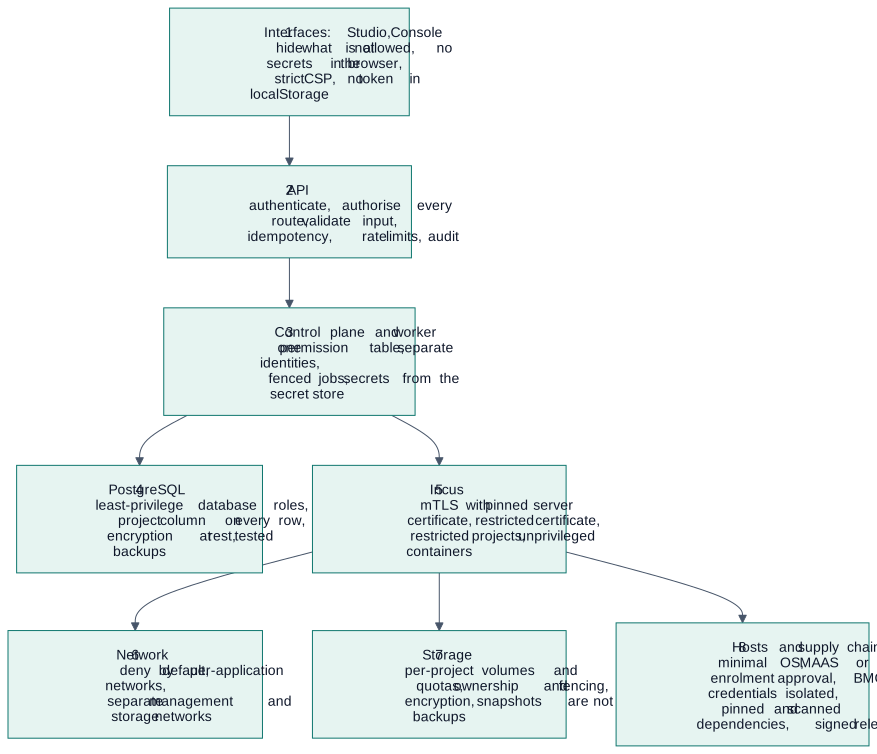
Diagram source
flowchart TB
  L1["1 Interfaces: Studio, Console<br/>hide what is not allowed, no secrets in the browser,<br/>strict CSP, no token in localStorage"]
  L2["2 API<br/>authenticate, authorise every route, validate input,<br/>idempotency, rate limits, audit"]
  L3["3 Control plane and worker<br/>one permission table, separate identities,<br/>fenced jobs, secrets from the secret store"]
  L4["4 PostgreSQL<br/>least-privilege database roles, project column on every row,<br/>encryption at rest, tested backups"]
  L5["5 Incus<br/>mTLS with pinned server certificate, restricted certificate,<br/>restricted projects, unprivileged containers"]
  L6["6 Network<br/>deny by default, per-application networks,<br/>separate management and storage networks"]
  L7["7 Storage<br/>per-project volumes and quotas, ownership and fencing,<br/>encryption, snapshots are not backups"]
  L8["8 Hosts and supply chain<br/>minimal OS, MAAS or enrolment approval, BMC credentials isolated,<br/>pinned and scanned dependencies, signed releases"]
  L1 --> L2 --> L3 --> L4
  L3 --> L5 --> L6
  L5 --> L7
L5 --> L8| Layer | Do (BUILT unless marked) | Add (PROPOSED) |
|---|---|---|
| Interfaces | Navigation and buttons follow whoami permissions; the API token lives in sessionStorage of the tab, never localStorage; the browser talks only to the Apelora API; destructive actions need typed confirmation; no secret values in designs (secret properties hold a reference name) | Content-Security-Policy and other security headers on both apps; sign-in with OIDC (authorisation code with PKCE) and short-lived tokens; idle sign-out; no sensitive data in URLs |
| API | Authentication and a named permission on every route; hashed tokens with expiry and revocation; input validated; Idempotency-Key; audit events; OpenAPI as the contract | Per-project scope on every route; rate limiting and request size limits; consistent error bodies that never reveal internals; ETag/If-Match on documents; CORS allow-list |
| Control plane and worker | Permission table in one crate; two Incus identities (deploy identity restricted to projects, admin identity only for cluster administration); jobs with leases and fencing generations; secrets not logged (Debug redaction) | Secrets from a secret store (not environment files); short-lived credentials for CI; periodic access review report; break-glass procedure with alarm |
| PostgreSQL | Apelora state only; migrations in the repository | Separate database roles: application (no DDL, no superuser), migration, read-only reporting; TLS to the database; row filters by project; encryption at rest; backup restore drill |
| Incus | mTLS with server-certificate pinning; deploy identity restricted to listed projects; restricted projects; unprivileged containers; no host mounts or raw configuration for tenants; healing off by default | Certificate rotation on a schedule (runbook exists); audit of Incus-side events correlated with Apelora's; project limits (CPU, memory, disk, instance counts) per tenant |
| Network | Deny-by-default connections compiled from the graph; per-application OVN networks and ACLs; internet access only through an explicit @external | Management, storage and BMC networks separated and not reachable from tenant networks; egress allow-lists |
| Storage | Ownership labels (user.apelora.*) written only by Apelora | Volumes created per project with quotas; encryption where the backend supports it; restore tests; fencing before any stateful move (storage) |
| Hosts and supply chain | cargo deny, npm licence and audit checks, secret scanning, draft releases with checksums, pinned Incus version (upstream.lock.yaml) | Signed release artefacts and a software bill of materials; minimal host image; host patching runbook; separate credentials per environment |
6. Identity
| Identity | State | Notes |
|---|---|---|
| People | BUILT: OIDC sign-in, local accounts and directories (LDAP over TLS); groups from a provider or a directory map onto Apelora groups, each mapping tied to its source (ADR 0016); API tokens created by an administrator, shown once, hashed in storage, with a role, expiry and last-use | Multi-factor authentication is the provider's job; tokens remain for automation only |
| Automation | BUILT: API tokens | PROPOSED: tokens bound to one scope and role, short expiry, named owner, visible in the Console |
| Apelora → Incus | BUILT: deploy identity (restricted) and admin identity (unrestricted) as two certificates | Rotate on schedule; store only in the backend's secret store |
| Hosts → cluster | BUILT: single-use join tokens issued after an administrator approves the machine | MAAS provisioning later (ADR 0002) |
7. Break-glass
Direct access to Incus on a host bypasses Apelora's authorisation and audit. It exists for outages (for example loss of quorum, see the runbooks) and is therefore: limited to a few named administrators, done from the host, announced, followed by a written account, and reconciled afterwards (Apelora reads actual Incus state before acting). It is never offered to tenants or designers. PROPOSED: alert when an Incus-side change has no matching Apelora audit event.
8. What to build, in order
- Document the current roles in the Console administration view (read-only list of roles and what they allow). Small.
- Project scoping: add a project column to applications and bindings; check scope in the authorisation helper; tests that a designer in project A cannot read project B.
viewerrole and the permission split (read-applications,operate-instances).- Security headers and CSP for both apps.
- OIDC sign-in and group-to-role mapping.
- Optional release approval (
approve-deployment).
Each step needs tests on the server first (a role without the permission gets 403 on every affected route), then UI behaviour, then a real-browser check. Keep the list of routes and the permission each needs generated from the code or the OpenAPI document so it cannot drift.
This page is a copy of docs/architecture/ACCESS-AND-ROLES.md in the repository, which is the source of truth. Suggest a change.